Common Referencing Errors
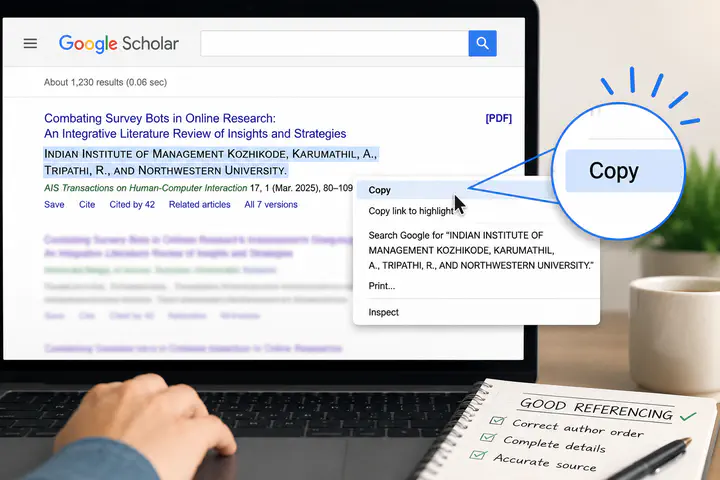 Be careful with how references are collected, stored, and translated into BibTeX. Simple copy/paste off of Google Scholar can lead to errors. (ChatGPT Generated image)
As Technical Paper Co-Chair for SOUPS 2026, I lead a group of volunteers that checked references in accepted but not-yet-published papers. I reached out to authors about the serious issues we observed and how they came about. I have also been speaking to members of the community about the process we took this year and listening to the experiences of other conference organizers. Below I detail recommendations based on my observations. Each recommendation is paired with a “why” where I talk about what we observed.
Outline
- Reference storage
- Diff any changes AI makes to paper text
- Openly discuss GenAI usage in labs
- Write clean, accurate BibTeX
Reference storage
Store references directly in BibTeX
Store references such that all the data is correctly stored in a stuctured format, ideally BibTeX. At minimum store references in a format that can be directly exported to BibTeX (e.g. Mendeley or Zotero) without having to go through an intermediary that has to re-interpret the reference content: like an LLM or a junior researcher.
Keep in mind that conversion to a BibTeX file requries some modification of references such as identifying authors’ first and last names seperately, and ensuring that some capitalization, such as DNS, is properly preserved.
Why: Several possible hallucinations at SOUPS this year were caused by an author storing their references in some other format such as Word or Excel and then day of submission trying to move all those references over into BibTeX. Due to time limitations they used approaches like asking an LLM to do it or asking a very junior researcher to do it for them. We observed that such reference copying resulted in fabricated-looking references.
Keep separate BibTeX files based on reference provenence
Know which references have been carefully checked and which have not. One option LaTeX provides is having multiple BibTeX files. Consider using this feature to store the references that have been carefully checked seperate from those where checking has not yet happened. Also consider using it to seperate out references that have been blinded for submission.
Why: It is good practice to record the papers read somewhere, and it can be time consuming to clearly check all aspects of a reference that may never be used in a paper. As a result, people use tools like Zotero and Mendeley which can automatically collect bibliography information and store it quickly.
These tools are amazing, save time, and ensure researchers have a fast-to-create record of papers they have seen. But these tools very often fail when it comes to creating a full and correct reference. They can omit authors, leave out venues, or record the wrong location for a conference. They are also less effective at capturing things like which chapter of a book the researcher is referring to, or the exact page number being referenced.
We observed many of these errors at SOUPS 2026. Some communication with authors suggest that tools like Zotero and Mendeley combined with not double checking their output is to blame. So please use these tools with care, and to save time consider using seperate BibTeX files for auto-collected references and hand-cleaned references.
Diff any changes AI makes to paper text
Tracking of changes made by authors is already a supported feature in tools like Overleaf and Git. Because LaTeX is code-like, many labs are already storing their raw paper LaTeX in repositories that support tracking and visual representations of changes. Even Word has some limited ability to track changes.
We recommend that if an AI is used to do “minor” things like “just clean up the text a bit”, that authors consider doing a local checkin before/after the change and review any tool-provided diff of the versions. It is vital to make sure the AI only changed the parts of the paper it was instructed to. The easiest ways to do such checks is to automatically compare the old and new text with a tool that creates a visual highlight of the changes. Doing so makes it easy to skim to see what was changed.
Why: Many PhD students at conferences talk to me about near miss situations where they asked GenAI to make a small change in one part of the paper only to find later that it had touched other parts like swapping out part of their bibliography references. These cases left the students supprised and a bit shaken that the AI would do that. The changes they described were also well outside the scope of what they had instructed the AI to do. A simple skim of a visual diff, or a list of line numbers with changes, would have easily caught these cases.
Tools: I would love it if Overleaf allowed us to register GenAI as a separtate user and mark all changes it makes as needing approval. It would make it much easier for a student to review the changes, learn from the changes, and spot changes that they did not ask for with the option to easily reverse them.
Openly discuss GenAI usage in labs
Generative AI is being actively used by all types of researchers, it is also being actively added into tools used by researchers, sometimes with very little labeling. We recommend having open discussions within lab groups about what kind of GenAI tools people are finding useful, how they are using them, and how they are ensuring accuracy of any output.
There is currently a view that Generative AI can be used responsibly. Regardless of if you subscribe to this view or not, odds are some of the other members of your lab or larger research groups do hold this view. I believe that it is important to have open dialog about what responsible AI usage looks like and actively discussing how output is being reviewed. Outright banning GenAI usage may be causing lab members to use it in secret or not be willing to openly discuss tools that maybe use GenAI. It is important as a community that we ensure open and supportive dialog within labs on this topic.
Why: In all cases we handled this year, the potential fabrications were a supprise to supervisors. Some firmly believed, before our communication, that GenAI was not used in their paper construction at all. When talking with students at conferences there is often a tone of “well I only used it for X” with an implication that this was a small immaterial usage that need not be disclosed. We expect that this attitude combined with knowledge that the supervisor does not support GenAI usage, may be leading to secret usages of GenAI.
Write clean, accurate BibTeX
Below are high-level suggestions to keep in mind when cleaning references.
Paper PDF on the publisher site is the official correct information
Officially the correct reference is always the information on the paper PDF as downloaded from the publisher’s website. If there is a conflict between the paper PDF and the publisher metadata, the PDF is considered to be the more accurate. When providing a URL to a paper, preferably use the DOI that links to the publisher version, or a link to the publisher’s site. Avoid linking to less-canonical sites like the author’s website, or Research Gate unless there is no other option.
Why: The metadata on places like DBLP, and Google Scholar have a high quality mix. We saw several cases of authors taking their bibliography information from these sites, but that information did not match the actual paper. We also observed cases where the correct DOI was linked to, but author names had been copied from Google Scholar and did not match the PDF the link lead to.
Many publishers offer a BibTeX citation download directly, this is often, but not aways, accurate. It is advisable to always start with the publisher-provided BibTeX and then check that the information matches the paper PDF and nothing is missing.
arXiv: Include version numbers when referencing arXiv
arXiv gives several DOI number options for citing a paper, including to the paper in general AND the individual versions. Make sure to use the DOI that includes the version number.
- arXiv:2408.08967v1 <- use
- arXiv:2408.08967 <- avoid
Why: An arXiv paper is not peer-reviewed, so it can change quite significantly between versions, including swapping out the title entirely or changing the author list. We saw some papers get flagged by the citation checker because the reference information was from v1 but the link didn’t specify the version, so the citation checker looked att the most recent version (v2) and concluded that the reference did not match and might be hallucinated.
Train students in BibTeX author list and title formatting
Author lists and titles are the two parts of BibTeX that require the most manual reformatting when copying content off the Web. Students need to be trained in how to correctly do the necessary conversions.
Authors in BibTeX format need to be formatted: surname, first name and surname, first name. Critical here is the ordering of surname first, and the use of ‘and’ between author names. Other formats produce hallucinated-looking output.
Titles of papers need to be adjusted to ensure preservation of upper and lower case. BibTeX will default to sentence case, but that will cause words like “URL” to be converted to “url”. The easiest solution is to use double curly brackets around the correctly formatted title (see example below).
Why: Graduate students seem to be turning to GenAI to help them convert references into BibTeX partially because they do not know how to write BibTeX themselves and they do not know what correctly formatted BibTeX looks like.
We saw cases with missing or mangled authors where the cause turned out to be poor BibTeX author formatting of a real and otherwise accurate BibTeX entry. See the correct and wrong examples below. Note the impact of BibTeX formatting on the resulting capitalization and author names.
Correct
@inproceedings{althobaiti2021chi,
  author = {Althobaiti, Kholoud and Meng, Nicole and Vaniea, Kami},
  title = {{I Don't Need an Expert! Making URL Phishing Features Human Comprehensible}},
  booktitle = {CHI '21},
  year = {2021}
}
Rendered in IEEEtran format:
K. Althobaiti, N. Meng, and K. Vaniea, “I Don’t Need an Expert! Making URL Phishing Features Human Comprehensible,” in CHI ’21, 2021.
Wrong
@inproceedings{althobaiti2021chi,
  author = {K Althobaiti, N Meng, K Vaniea},
  title = {I Don't Need an Expert! Making URL Phishing Features Human Comprehensible},
  booktitle = {CHI '21},
  year = {2021}
}
Rendered in IEEEtran format:
K. V. K Althobaiti, N Meng, “I don’t need an expert! making url phishing features human comprehensible,” in CHI ’21, 2021.
The above rendered output has several issues:
Incorrect author parsing. In BibTeX commas do not separate authors, the only way to separate authors is the word “and”. Any other way of breaking up authors causes them to be parsed as one author.
- Detailed explaination: Because of the lack of ‘and’ in the author list, BibTeX only sees one author. Imagine the name “Simon Jones, Jr” where “Jr” is the suffix, in this case it is short for “Junior” which is used when a parent and child share a name. In LaTeX this should be written like: “Surname, Suffix, FirstName” or “Jones, Jr., Simon”. In the example above, LaTeX has parsed “K Althobaiti” as the surname, “N Meng” as the suffix, and “K Vaniea” as the first name. Thereby producing the singular author: “K. V. K Althobaiti, N Meng” formatted as “abbreviated firstname surname, suffix”
Capitalization wrong. The title has “url” instead of “URL”. Similarly there is a `!’ incorrectly followed by a lowercase. The use of double curly braces in the correct version above prevents this capitalization adjustment from happening.
Full author names. Full authors names should always be recorded in BibTeX. The IEEEtrans format above auto converts first name’s into initials, but other formats like ACM Reference Format shows the first names. It is always better to include first names in full in the BibTeX so that different formats can be applied.
Kami Vaniea
Associate Professor of Usable Privacy and Security
I research how people interact with cyber security and privacy technology.